Reward Management helps WooCommerce store owners manage customer-level referral performance and rewards from one place. You can review referrers, referral history, customer stats, reward coupons, and reward points, then apply custom referral or reward logic for individual customers when needed.
Accessing the Reward Management dashboard #
1. Log in to your WordPress Admin Dashboard.
2. From the left admin menu, click EchoRewards.
3. Select Reward Management from the EchoRewards submenu.
4. Review the Quick Summary cards at the top.
5. Use All Referrers to search, filter, or open a customer profile.
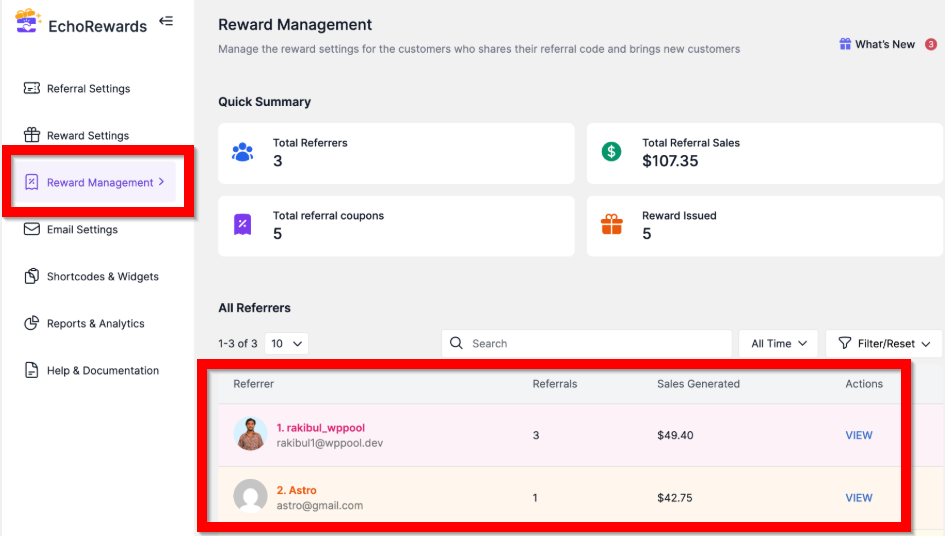
Use Reward Management to view quick stats, referrers, referrals, generated sales, and profile actions.
Understanding the Quick Summary #
- Total Referrers: The total number of customers participating as referrers.
- Total Referral Sales: Total sales generated through referral activity.
- Total Referral Coupons: Number of referral coupons generated for referred customers.
- Reward Issued: Number of rewards already issued to referrers.
Opening a Customer Profile #
Use the All Referrers table to search or filter by customer. Click View to open their profile. Inside, you’ll find four tabs: Referral History, Reward Coupons, Reward Points, and customer-level stats.
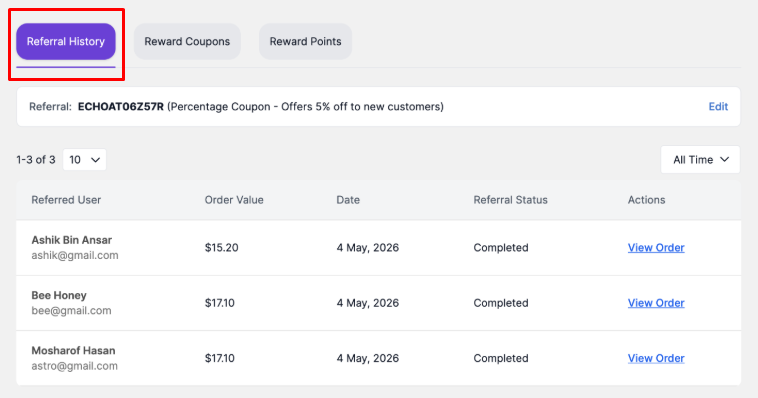
Referral History tab showing referred users, order value, date, referral status, and related order actions.
Referral History #
Use this tab to audit referral activity before acting on it.
- See each referred user and the order value they generated.
- Check referral status before issuing, canceling, or flagging a reward.
- Click View Order to validate the referral directly in WooCommerce.
- Use the date filter to narrow activity to a specific period.


