EchoRewards
  • Features
  • Pricing
  • Products
  • Help Center
  • Roadmap
Join Community
  • Get Started Now
  • Join Community Get Started Now
    • Referral Coupon Generation
    • Coupon Customization
    • Email Customization
    • Floating Referral Widget
    • Reporting and Analytics
    • WP Dark Mode
      WP Dark Mode

      A stunning WordPress Dark Mode experience

    • FlexTable
      FlexTablehot HOT

      Automatically sync Google Spreadsheets with WP tables

    • FormyChat
      FormyChat

      Send contact form leads to WhatsApp

    • FlexStock
      FlexStock hot Hot

      Sync WooCommerce stock with Google Sheet and manage easily

    • FlexOrder
      FlexOrder new ⚡

      Manage WooCommerce orders from Google Sheets

    • Easy Video Reviews
      Easy Video Reviews

      Get powerful video testimonials with ease and boost sales

    • EchoRewards
      EchoRewards new ⚡

      Referral Plugin for WooCommerce

    • Jisi Meet
      FlexMeeting

      Webinar & video conferences within WordPress

    • FlexSync for Shopify
      FlexSync for Shopify new ⚡

      Manage Shopify inventory from Google Sheets

    • ArchiveMaster
      ArchiveMaster new ⚡

      Speed up your WooCommerce store by archiving old orders.

    • OMG Chat Widgets
      OMG Chat Widget

      Let customers contact via any social channel

    • Stock Notifier
      Stock Notifier for WooCommerce

      Send alerts to customer when product is back in stock

    • Docs
    • Blogs
    • Video Tutorials
    • What's new?
    • 🗂️ WooCommerce Glossary
    • FAQ
    • DreamLab Hire us!
    • Join Community
    • Support & Contact

    EchoRewards Docs

    20
    • How to get started with EchoRewards
    • How to configure the referral coupon settings
    • How to configure the reward coupon settings
    • How to send referral coupons via email
    • How to send reward coupons via email
    • How to share referral coupons with friends
    • How to enable/disable the floating referral widget
    • How to show or hide the WooCommerce referral tab on your store
    • How to set a discount cap
    • How to include/exclude referral coupons on products/categories
    • How to use EchoRewards Gutenberg block and Elementor referral widget
    • How to use EchoRewards referral shortcodes
    • How to use EchoRewards with WPFunnels & FunnelsKit
    • How to configure recurring discounts with EchoRewards
    • How to change ‘Menu name’ and ‘Icon’ in My Account Page
    • How to Use the EchoRewards Reward Management Dashboard
    • How to Customize Reward Coupons for Individual Customers in EchoRewards
    • How to Give Custom Reward Points to Specific Customers using EchoRewards
    • How to Customize Referral Rules Per Customer in EchoRewards
    • Apply Recurring Reward Coupons to Active, Existing, or New Subscriptions

    EchoRewards

    1
    • 📚 How to Translate Any String in EchoRewards (Using Loco Translate)
    • Home
    • Docs
    • EchoRewards Docs
    • How to Customize Reward Coupons for Individual Customers in EchoRewards
    View Categories

    How to Customize Reward Coupons for Individual Customers in EchoRewards

    Reward coupons are discount codes your store issues to referrers after a successful referral. For example, refer three people and receive a 20% off coupon. By default, every referrer gets the same coupon. Use this page to override that for a specific customer.

    If your store rewards referrers with points instead of coupons, see Reward Points.
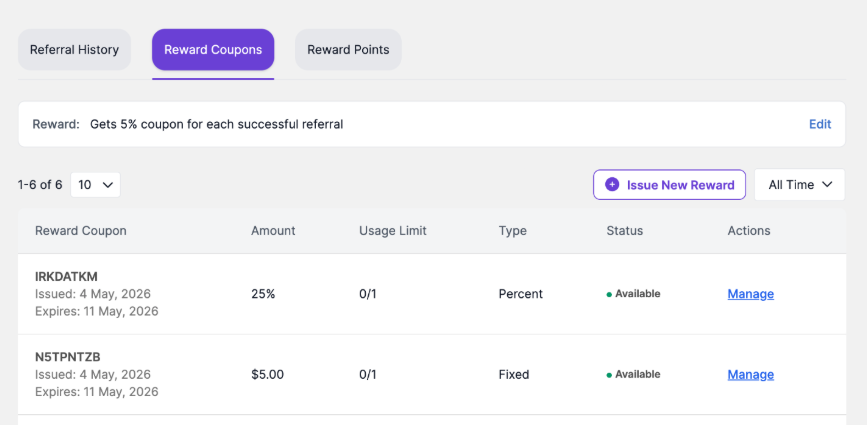
    Reward Coupons tab showing coupon code, amount, usage limit, type, status, and management actions.

    How to customize the reward coupon rule #

    1. Open the customer profile from EchoRewards > Reward Management.

    2. Click the Reward Coupons tab.

    3. Click Edit beside the reward coupon rule.

    4. Select the reward type, such as Percentage or Fixed, depending on available options.

    5. Enter the discount amount that this customer should receive for successful referrals.

    6. Configure optional controls such as discount capping, expiry date, usage limit, or minimum purchase amount.

    7. Click Save Changes.
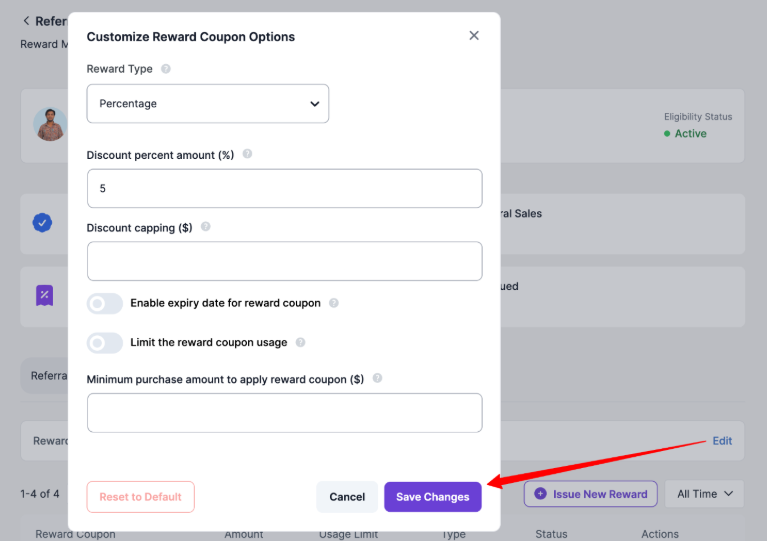
    Customize Reward Coupon Options modal for overriding the reward coupon logic of an individual customer.

    Manually Issuing a Reward Coupon #

    Use this when you need to issue a coupon outside the normal referral flow, such as for a campaign, manual compensation, or a one-off loyalty reward.

    1.  Open the customer profile from Reward Management.

    2.  Click the Reward Coupons tab.

    3.  Click Issue New Reward.

    4.  Select the Reward Type, such as Percentage or Fixed.

    5.  Enter the discount amount.

    6.  Optionally set discount capping, expiry date, usage limit, and minimum purchase amount.

    7.  Click Create Reward.
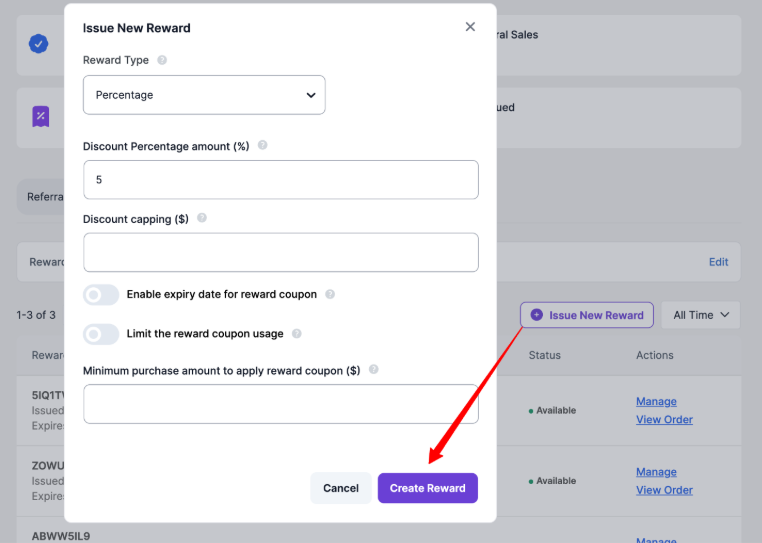
    Issue New Reward modal for configuring coupon type, amount, capping, expiry, usage limit, and minimum purchase.

    What are your Feelings

    Share This Article :

    • Facebook
    • X
    • LinkedIn
    • Pinterest
    Still stuck? How can we help?

    How can we help?

    Updated on May 12, 2026
    How to Use the EchoRewards Reward Management DashboardHow to Give Custom Reward Points to Specific Customers using EchoRewards
    Table of Contents
    • How to customize the reward coupon rule
    • Manually Issuing a Reward Coupon

    Elevate your store with a dynamic and rewarding referral system!

    Logo
    • Home
    • Pricing
    • Docs
    • Support
    • Partners
    • Roadmap
    • Affiliates
    • Facebook
    • Twitter
    • Linkedin
    • Youtube
    WPPOOL Logo

    © 2026 WPPOOL. All Rights Reserved.

    ×
    00DAYS
    00HRS
    00MINS
    00SEC
    Grab Before It Melts 🧊